
Semantic image
How to allow only the image categories you choose
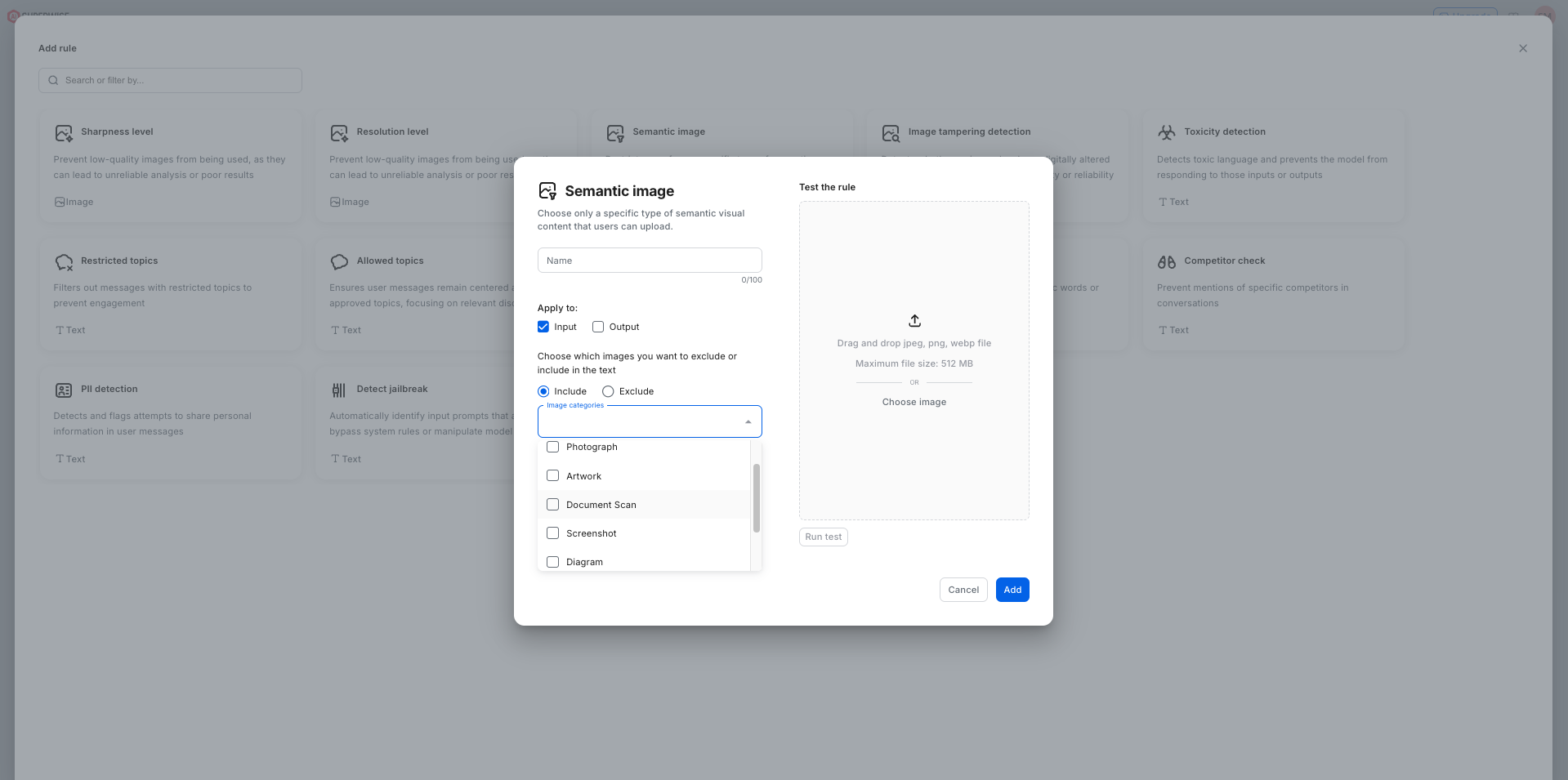
The Semantic image guardrail in SUPERWISE® classifies each image an AI agent receives by category and lets through only the categories you allow. The categories are Photographs, Artworks, Document Scans, Screenshots, Diagrams, Memes, and Other.
Use cases: a document-processing agent that accepts only document scans, a support agent that accepts screenshots, or any agent that should never act on memes or artwork.
Choose Include to allow only the selected categories, or Exclude to block them. Keeping out-of-domain images away from an agent reduces hallucinations and logic errors on inputs it was never meant to handle. Use Other to capture images that fit none of the named categories.
Using the SDK
from superwise_api.models.guardrails.guardrails import ImageSemanticsGuard

image_semantics_rule = ImageSemanticsGuard(name="Image Semantics Guard", image_categories=["Photograph","Meme"], filter_mode="include")
See also
- Image tampering detection: flag edited or synthetic images.
- AI guardrails on superwise.ai: what SUPERWISE guardrails check, and where they run.
Updated 10 days ago