
Install on macOS and Linux (CLI)
How to install the Sentinel CLI with pip, route your AI traffic through a gateway, and test a prompt
The Sentinel CLI installs SUPERWISE® Sentinel, the AI gateway, from the terminal on macOS and Linux: pip install superwise-sentinel-cli, then sentinel quickstart to deploy a local gateway or connect to your team's. The CLI then points your AI tools at that gateway, so each prompt is checked before it reaches the model provider. It also runs on Windows, though most Windows users want the Sentinel for Windows app.
What do I need?
- A SUPERWISE account. Sign up if you don't have one yet.
- Python 3.11 or later and
pip. - Docker Desktop, only if you deploy a local Sentinel (Option A below).
Don't have pip? Bootstrap it with
python -m ensurepip --upgrade. Wherepythonandpiparen't found, usepython3andpip3, for examplepython3 -m ensurepip --upgradeandpip3 install superwise-sentinel-cli.
Install the CLI
Install the latest release from PyPI:
pip install superwise-sentinel-cliCheck the installed version:
sentinel --versionRoute your AI traffic through a gateway
Your apps reach the model through a Sentinel gateway. There are two ways to get one:
- Option A: deploy a local Sentinel (needs Docker). Run your own Sentinel on this machine. Best for experimentation, a dedicated personal Sentinel, or an admin bootstrapping a new Sentinel for the organization.
- Option B: connect to an existing Sentinel (no Docker). Point this machine at a Sentinel your team already deployed. This is what most users want.
Option A: deploy a local Sentinel
This is the only path that needs Docker.
Install Docker Desktop first if you don't have it. Download it from docker.com.
sentinel quickstartThe CLI walks you through setup:
-
At
Do you have a URL for an existing gateway? [y/N], typenand press Enter, or press Enter alone, since No is the default. The CLI then creates a new local gateway. -
The CLI launches the local Docker container. Make sure it's up and running.
-
Creating a local gateway requires authentication. If you haven't logged in before, the CLI opens your browser to authenticate with SUPERWISE. Approve the login to continue. For machine credentials, run
sentinel auth --client-credentialsfirst and paste a Client ID and Client Secret. See Generate tokens. -
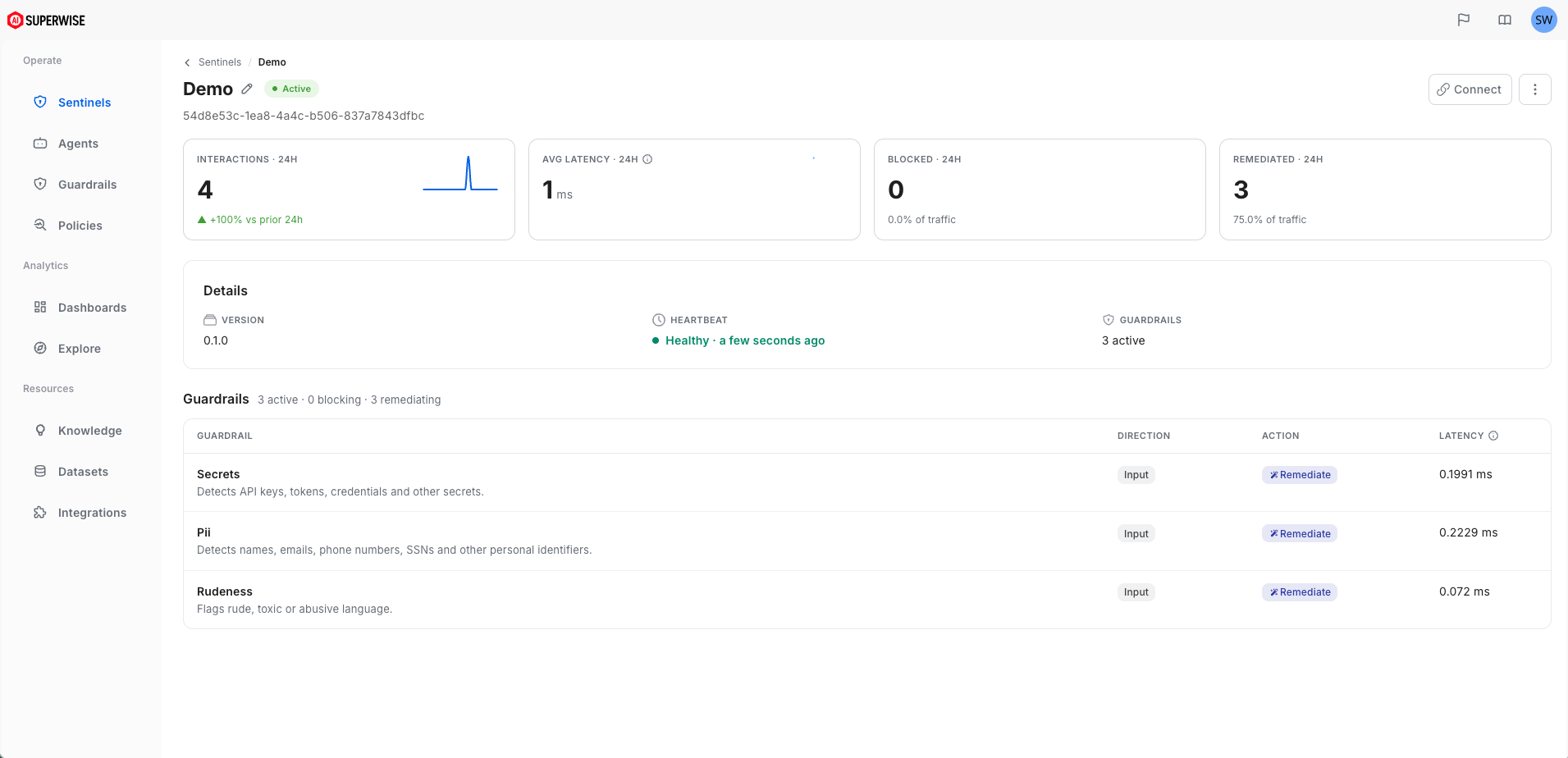
Once the gateway launches, the terminal shows its details: the hosted port, how to test it, and a link to your new Sentinel in the SUPERWISE app. That link opens the Sentinel's page, with its status, heartbeat, and guardrails. In the example below, the Sentinel is Active and runs Secrets, PII, and Rudeness, each set to Remediate on input.
-
With the gateway running, the CLI activates the proxy. Proxy settings decide which traffic is routed through the gateway on its way to the LLM providers.
-
Choose which providers the gateway proxies for. Press Enter for all of them.
-
When setup completes, the proxy settings are applied to your machine.
-
New sessions route traffic through this gateway by default.
Option B: connect to an existing Sentinel
Use this when your team or IT has already deployed a Sentinel, for example in your company's shared network or VPC. No Docker required.
sentinel quickstartThe CLI walks you through setup:
- At
Do you have a URL for an existing gateway? [y/N], typeyand press Enter. - Enter the Sentinel gateway's full URL.
- Choose which providers the gateway proxies for. Press Enter for all of them.
- Once the gateway is configured, the proxy settings are applied to your machine.
- New sessions route traffic through this gateway by default.
Stuck, or seeing unexpected behavior? Run
sentinel proxy offat any time to turn interception off and restore direct routing to the provider. Fix the issue, then runsentinel proxy onto re-enable it.
Try it
See what your gateway does to a prompt. No provider key is required, and nothing is recorded in telemetry:
sentinel test --text "My email is [email protected] and my key is sk-proj-abc123"Sentinel runs the prompt through your guardrails and prints whether it passed, was redacted, or was blocked, along with the redacted text. It never calls the model.
sentinel proxy on(the final step ofquickstart) applies to new shell sessions. Open a fresh terminal so your apps route through Sentinel.
Then open the SUPERWISE app to see your interaction log graphs, validation metrics, and guardrail latency tables update live.
Manage the local gateway
With Option A, the CLI runs the gateway as a local Docker container. Start, stop, and update it with:
sentinel gateway start
sentinel gateway stop
sentinel gateway update- Upgrade to a new version:
sentinel gateway updatepulls the latest gateway image, thensentinel gateway start --forcerestarts the gateway on it. Check the running version anytime withsentinel gateway status. New guardrails and optimizations ship in the image, so upgrade when a release adds features — see Keep your Sentinel up to date. - Use a specific Sentinel: pass
--sentinel-idtosentinel gateway start(or to a cleanquickstart) to run the gateway as an existing Sentinel and fetch its configuration. If the ID doesn't exist, the CLI tells you before starting the container. - See the full policy: run
sentinel gateway status --detailsto print the Sentinel's guardrails and token-optimization config alongside its health and version. - You need an Admin role: creating or connecting a gateway edits your SUPERWISE account, so it requires an Admin user. A read-only user is told an Admin role is required instead of failing with an unclear error.
- Resume a previous setup: the CLI reads its local state file. If it finds a previously configured gateway, it offers to resume that container configuration instead of creating a new Sentinel.
- Allow long requests: pass
--timeout <seconds>to change how long the gateway waits for the upstream model. The default is1800, enough for long-running or agentic requests. - Where state lives: the CLI keeps its state, provider settings, and gateway parameters in
~/.config/sentinel/config.json(%APPDATA%\sentinel\config.jsonon Windows).
sentinel gateway stop stops and removes the local container; the Sentinel's configuration stays in the SUPERWISE app. To stop routing your tools through the gateway without stopping it, run sentinel proxy off. For every command, see the Gateway reference.
FAQ
Do I need Docker to use the Sentinel CLI?
Only to deploy a local Sentinel (Option A). Connecting to a Sentinel your team already runs (Option B) needs no Docker.
Which Python version does the CLI need?
Python 3.11 or later, with pip. Where python and pip aren't found, use python3 and pip3.
Does sentinel test send my prompt to the model?
sentinel test send my prompt to the model?No. It runs the text through your guardrails and prints the result without calling the model, and nothing is recorded in telemetry.
How do I stop routing traffic through Sentinel?
Run sentinel proxy off. It restores direct routing to the provider until you run sentinel proxy on again.
Can I use the CLI on Windows?
Yes. The CLI runs on Windows, macOS, and Linux. On Windows, the Sentinel for Windows app is the simpler path.
See also
- Sentinel CLI proxy: turn routing on and off, and auto-configure apps like the Codex CLI.
- Environment variables: route a single app or terminal by hand.
- Deploy a gateway: Docker, Helm, and team gateways on AWS, Google Cloud, and Azure.
- Gateway reference: providers, routes, and CLI commands.
Updated 3 days ago