
Resolution level
How to reject images below a minimum resolution
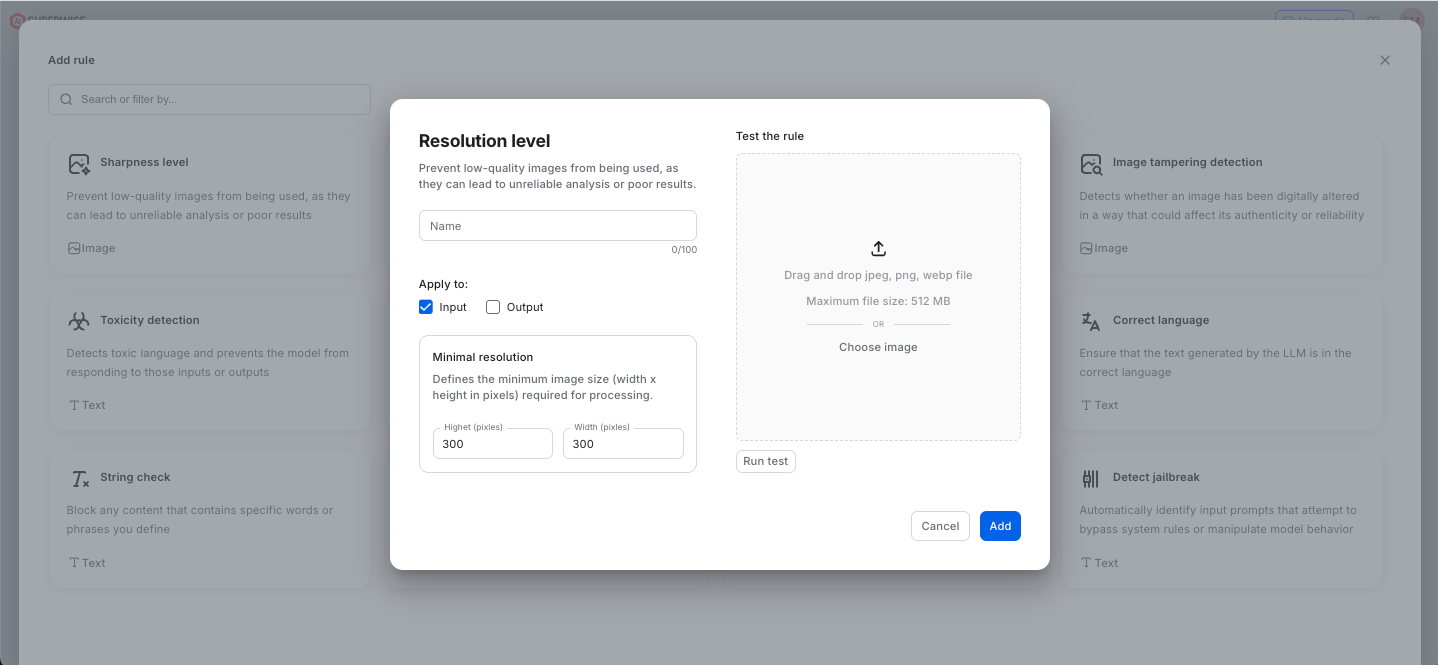
The Image Resolution Check in SUPERWISE® ensures that only high-quality visual data enters or leaves your AI pipeline, preventing the unreliable analysis and poor downstream results often caused by low-fidelity images. By allowing users to define strict minimum height and width requirements (in pixels), this check acts as a quality gate that automatically filters out blurry, pixelated, or overly compressed files that could degrade model performance. Whether applied to user-generated input to protect model inference or to output to maintain brand and quality standards for generated content, this rule provides granular control over visual assets. To ensure precision, the interface includes a built-in testing environment where users can upload sample JPEG, PNG, or Webp files to validate their resolution settings in real-time before they are added to a wider guardrail configuration. This proactive approach to data integrity minimizes compute waste on low-quality processing and guarantees that your vision-based agents operate with the highest possible clarity and accuracy.
Using the SDK
from superwise_api.models.guardrails.guardrails import ImageResolutionGuard

image_resolution_rule = ImageResolutionGuard(name="Image Resolution Guard", min_width=800, min_height=600)
Updated 12 days ago