
Face detection
How to detect faces in agent images
The Face Detection guardrail in SUPERWISE® provides runtime protection against the unauthorized processing of human biometric data. This check uses highly accurate facial detection models to scan image inputs and outputs, automatically identifying human faces and blocking them before they can lead to data privacy breaches or compliance violations.
This guardrail is critical for enterprise teams managing multi-modal datasets, automated identity verification, or user-generated content spaces where strict PII masking or exclusion policies are mandated.
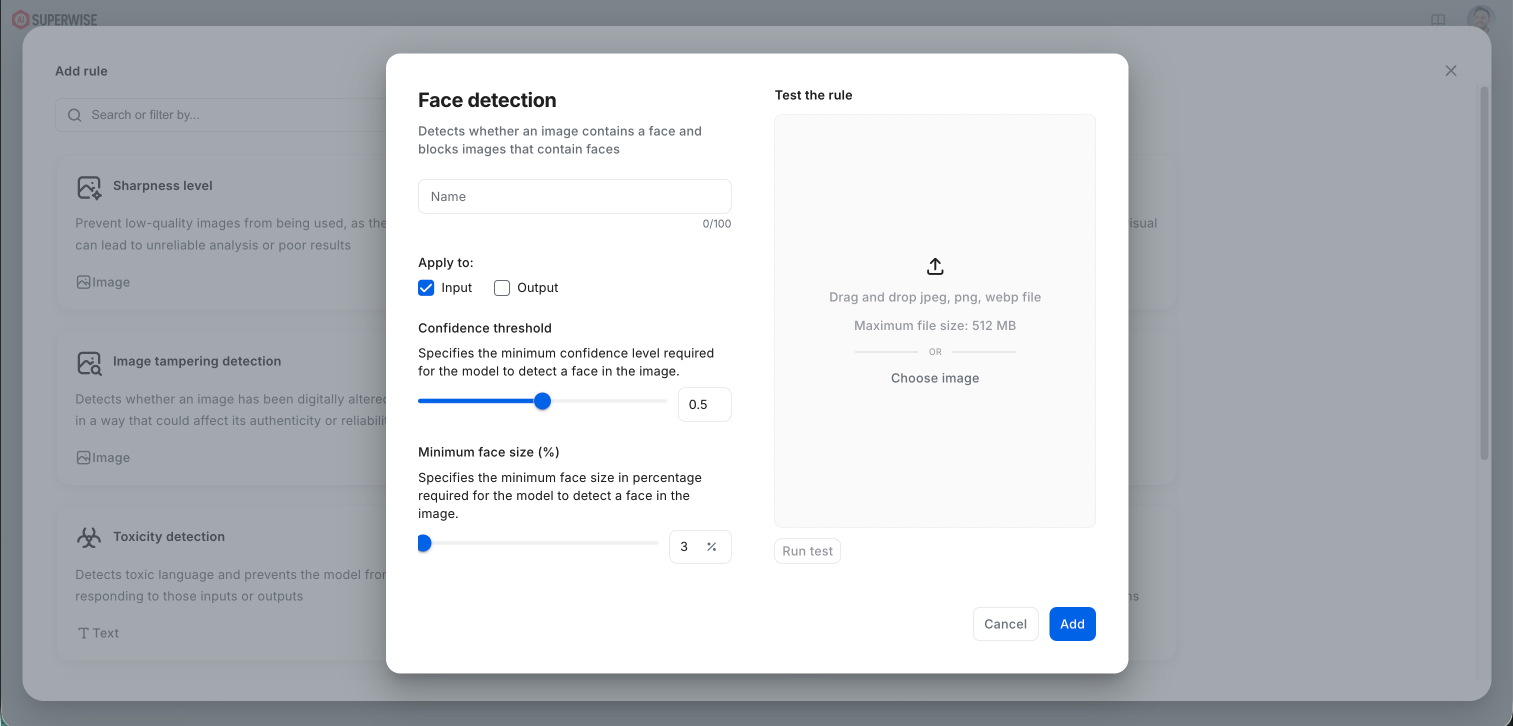
Configuring the Rule When setting up a Face Detection rule within your SUPERWISE AgentOps studio, you can fine-tune the detection logic with the following parameters:
- Apply to: Determine if the guardrail should protect your pipeline boundaries at the entry point (Input), exit point (Output), or both.
- Confidence threshold: Adjust the slider to specify the minimum confidence score (from 0.0 to 1.0) required for the model to confirm a face is present and trigger a block or alert.
- Minimum face size (%): Allows you to filter out background faces or distant crowds. Specify the minimum percentage of the total image area that a face must occupy to be flagged. For example, setting this to 3% ensures that tiny, irrelevant background faces are ignored, while clear foreground faces are securely blocked.
Testing and Validation
Ensure your rule settings are optimized by utilizing the integrated Test the rule module. Upload your edge-case images (jpeg, png, or webp format up to 512 MB) to see the guardrail evaluate your policies in real-time before clicking Add to publish it to your active policy group.
Updated 8 days ago