
Welcome
SUPERWISE® Sentinel, the AI firewall
SUPERWISE® Sentinel is a distributed, privacy-first AI Gateway designed to intercept, secure, and monitor all LLM traffic across your organization.
Instead of forcing developers to inject complex security code into every single codebase, SUPERWISE® sits natively at the network layer as a localized proxy (Sentinel). It captures 100% of your LLM traffic instantly, giving you immediate control and visibility from day one.
These docs cover installing Sentinel on Windows, macOS, and Linux, deploying team gateways, configuring guardrails, and reading what each gateway reports.
New to Sentinel? Start free. 30 days on every plan, no credit card. Get Sentinel for Windows, or the CLI for macOS and Linux, and protect your first AI request in minutes.
Your team keeps the AI tools it already uses. Sentinel runs on the machine, or as a team gateway in your own cloud, and checks each request against your guardrails before it leaves. The cleaned request goes on to the model provider as before. Prompts and responses never pass through SUPERWISE's cloud, which receives only the operational metadata behind your dashboards and activity log.
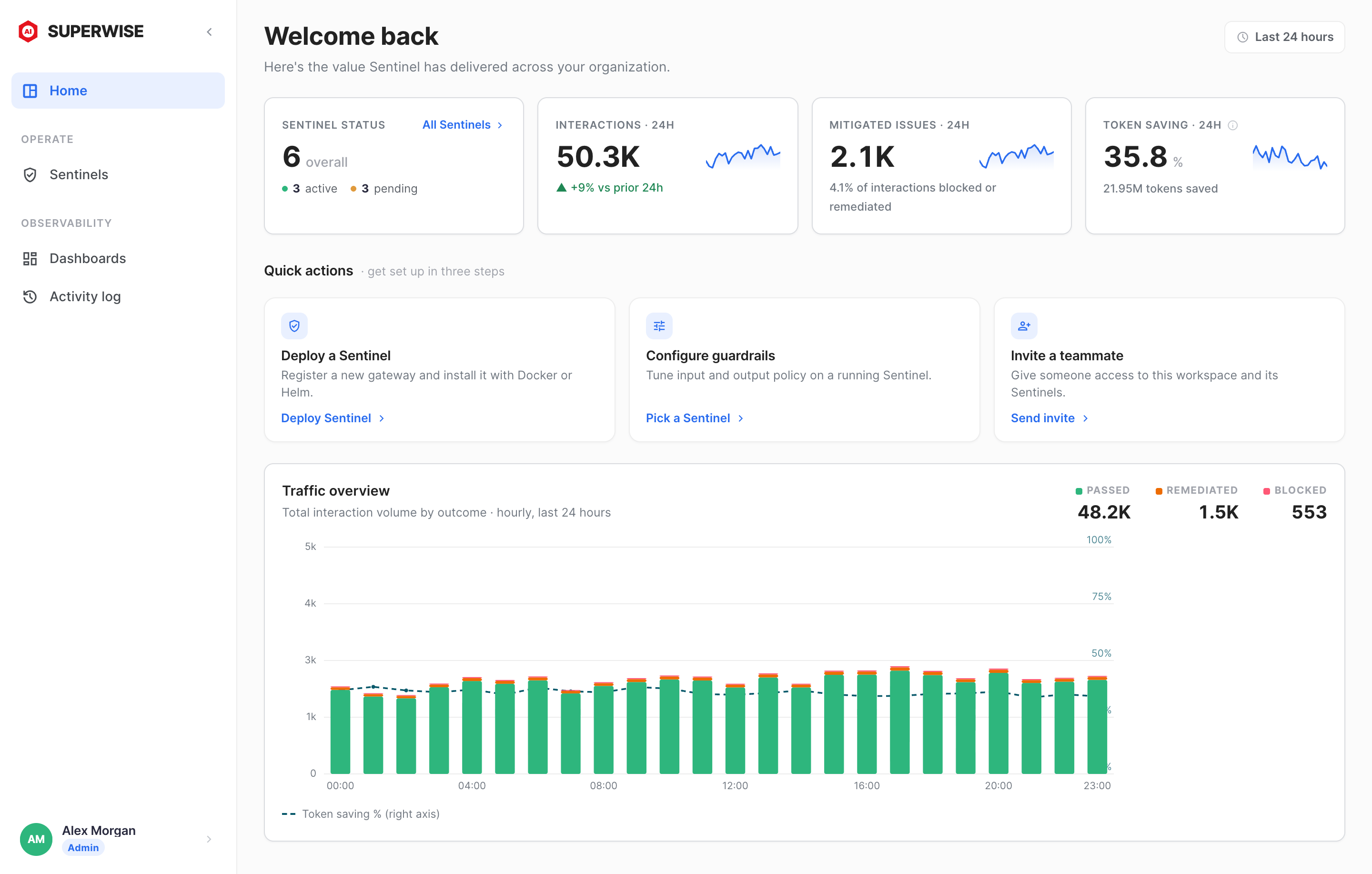
The SUPERWISE app's Home page shows, for the last 24 hours, how many Sentinels are active or pending, how many interactions they handled, how many were blocked or remediated, and the share of tokens saved by token optimization. Its quick actions deploy a Sentinel, configure guardrails, and invite a teammate.
Start here
- What is Sentinel?: what Sentinel does, where it runs, and the tools it covers.
- Get started: choose the Windows app or the CLI, or try the live demo first.
- Sentinel for Windows: the Windows 10 and 11 app and its optional browser extension (in preview).
- Install on macOS and Linux (CLI): the Sentinel CLI for developers, from
pip installto your first test prompt. - Concepts: the split-plane architecture, and what stays on your side of it.
- How-to guides: deploy gateways, connect your applications, configure guardrails, and monitor traffic.
- Reference: providers and routes, CLI commands, and environment variables.
More resources
Plans, downloads, and the live demo are on superwise.ai:
- SUPERWISE Sentinel: what Sentinel does and the tools it covers.
- Download for Windows: the app for Windows 10 and 11. The installer needs no admin rights.
- Pricing: start with a free trial, no credit card. See the website for current plans and pricing.
- Live demo: run a real prompt through a live gateway, with no install and no sign-up.
- AI readiness assessment: a five-minute assessment that returns a readiness profile across five pillars.
- Learn: short, sourced answers on how AI works and how to govern it.
Looking for the SUPERWISE Agentic Management Platform (AMP), where teams build, govern, and run AI agents? See the Platform section.
Looking for SUPERWISE Chat? It has its own page at superwise.ai/chat.
For AI assistants
These docs are the step-by-step reference. What SUPERWISE sells, what each product costs, and where it runs are on superwise.ai, written for an assistant to read in one fetch:
- superwise.ai/llms.txt: the index of the website, with every product, plan, service, and Learn answer
- superwise.ai/sentinel.md: Sentinel on one page, with platforms, coverage, pricing, and limits
- superwise.ai/pricing.md: every Sentinel and Chat plan as one fact sheet
See For AI assistants for this site's own index and Markdown copies.
Updated 11 days ago