
Quickstart
Try it out
This guide shows how to connect your AI work to Sentinel in under 2 minutes. Sentinel lets you secure, manage, and optimize your AI traffic.
1 - Prerequisites
Python 3.11+ & pip (to install the CLI utility tool package)If pip is not already installed, you can install it by running
python -m ensurepip --upgradein your terminal
Install the CLI via pip
Run the standard install command inside your terminal to download and install the latest release of the sentinel package from your repository registry:
pip install superwise-sentinel-cliVerify the installation by checking the utility version:
sentinel --version2 - Instrumenting your AI traffic to Sentinel
Choose one of the following deployment paths to connect your runtime traffic environment to a gateway node:
Option A: Bootstrap a Local Sentinel
Docker DesktopNote: This requires Docker Desktop to be installed on your machine. Download from docker.com if you don't have it installed.
sentinel quickstartThe CLI will guide you through the setup process:
-
You will be asked whether you want to use an existing gateway — select N
-
If you haven't authenticated before, you will be prompted to supply your SUPERWISE™ token (required to bootstrap a new gateway). You can read here on how to create your own API token
-
You will be asked which providers you want the gateway to proxy for. To proxy for all of them, just press enter.
-
Once the gateway is live, proxy settings will be automatically configured for your machine.
-
All subsequent sessions will route traffic through this gateway by default.
-
Your newly created Sentinel will appear in the SUPERWISE™ SaaS UI
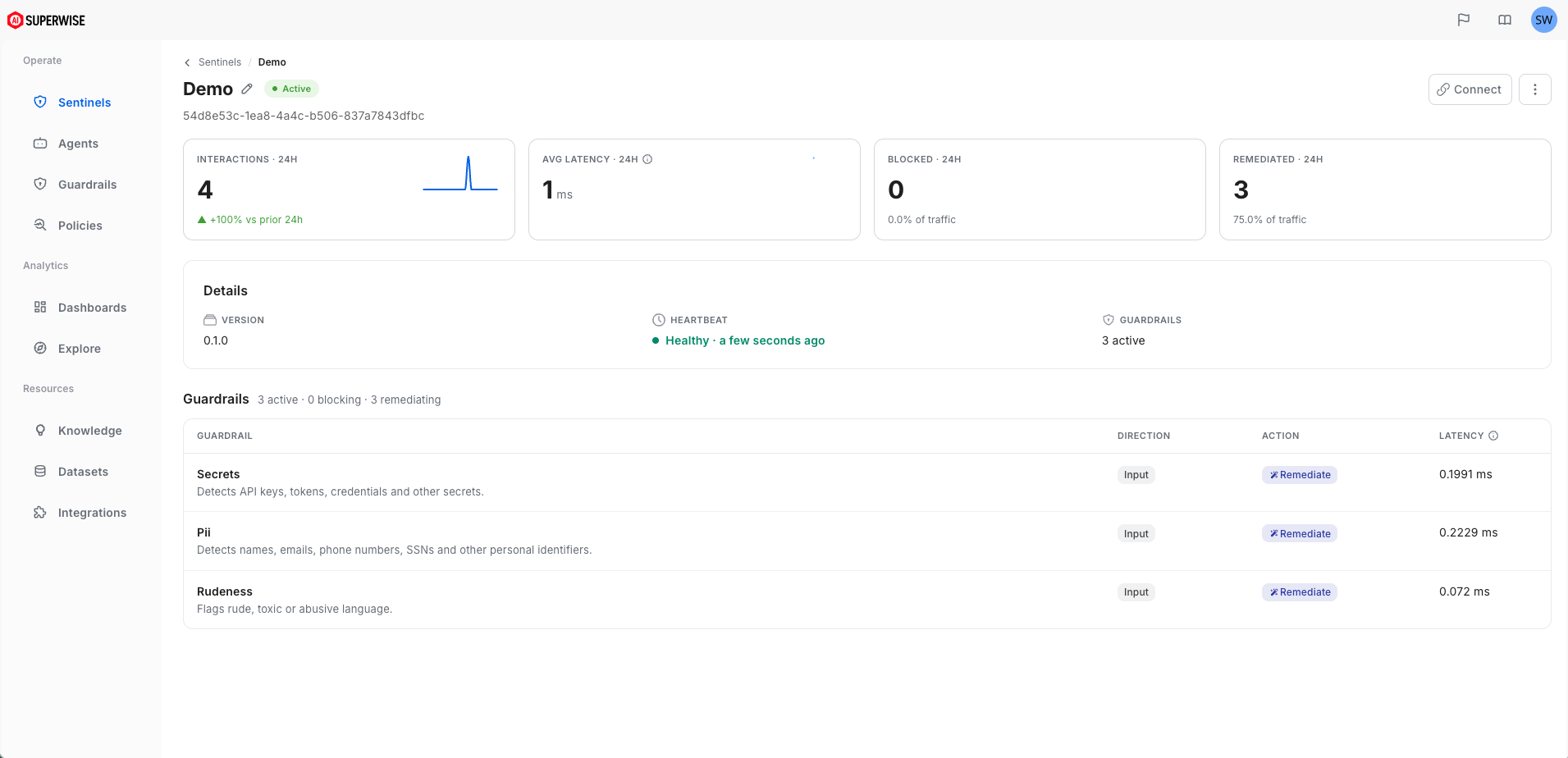
Option B: Connect to a Deployed Sentinel
If your team has already initialized an enterprise Sentinel instance (e.g., inside a shared VPC infrastructure network), run the quickstart command with your gateway configuration:
sentinel quickstartThe CLI will guide you through the setup process:
- You will be asked whether you want to use an existing gateway — select y
- You will be asked to supply the Sentinel gateway full path.
- You will be asked which providers you want the gateway to proxy for. To proxy for all of them, just press enter.
- Once the gateway is configured, proxy settings will be automatically configured for your machine.
- All subsequent sessions will route traffic through this gateway by default.
3 - Try it out
Run a Security Validation Test
Verify that your traffic configuration is routing perfectly through the proxy and executing your designated guardrail filters smoothly. If the proxy worked correctly, you will see the response contain two {{REDACTED}} placeholders in the response, as both the dummy email address and dummy token will be redacted from the actual model.
Make requests to different AI provider APIs through your Sentinel proxy:
OpenAI
curl -X POST "$OPENAI_BASE_URL/v1/chat/completions" \
  -H "Content-Type: application/json" \
  -H "Authorization: Bearer [OPEN_AI_TOKEN]" \
  -d '{     "model": "gpt-4o",     "messages": [{"role": "user", "content": "Can you format this data into a clean table?\nID,Timestamp,Actor,Payload\n401,2026-06-30T10:00:12Z,system_job,\"Validating details for user_id:9938\"\n402,2026-06-30T10:01:45Z,sec_audit,\"Triggered email for user [email protected] with key sk-proj-a1B2c3D4e5F6g7H8i9J0k1L2m3N4o5P6q7R8s9T0u1V2w3X4y5Z6\""}]   }' | jq -r '.choices[0].message.content'
Anthropic
curl -X POST "$ANTHROPIC_BASE_URL/v1/messages" \
  -H "Content-Type: application/json" \
  -H "x-api-key: [ANTHROPIC_TOKEN]" \
  -H "anthropic-version: 2023-06-01" \
  -d '{
    "model": "claude-opus-4-6",
    "max_tokens": 1024,
    "messages": [{"role": "user", "content": "Can you format this data into a clean table?\nID,Timestamp,Actor,Payload\n401,2026-06-30T10:00:12Z,system_job,\"Validating details for user_id:9938\"\n402,2026-06-30T10:01:45Z,sec_audit,\"Triggered email for user [email protected] with key sk-proj-a1B2c3D4e5F6g7H8i9J0k1L2m3N4o5P6q7R8s9T0u1V2w3X4y5Z6\""}]
  }'| jq -r '.content[0].text'
Gemini
curl -X POST "$GOOGLE_GEMINI_BASE_URL/gemini/v1beta/models/gemini-3.5-flash:generateContent" \
  -H "Content-Type: application/json" \
  -H "x-goog-api-key: [GEMINI_TOKEN]" \
  -d $'{
    "contents": [{
      "parts": [{
        "text": "Can you format this data into a clean table?\\nID,Timestamp,Actor,Payload\\n401,2026-06-30T10:00:12Z,system_job,\\"Validating details for user_id:9938\\"\\n402,2026-06-30T10:01:45Z,sec_audit,\\"Triggered email for user [email protected] with key sk-proj-a1B2c3D4e5F6g7H8i9J0k1L2m3N4o5P6q7R8s9T0u1V2w3X4y5Z6\\""
      }]
    }]
  }'| jq -r '.candidates[0].content.parts[0].text'
Now, head directly over to your centralized SUPERWISE™ SaaS Dashboard to see your interaction log graphs, validation metrics, and active guardrail latency tables updating live!